Digital New Years Eve Party Invite: A Modern Take on Celebration
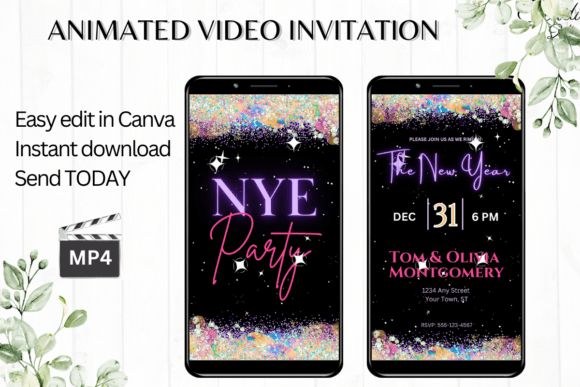
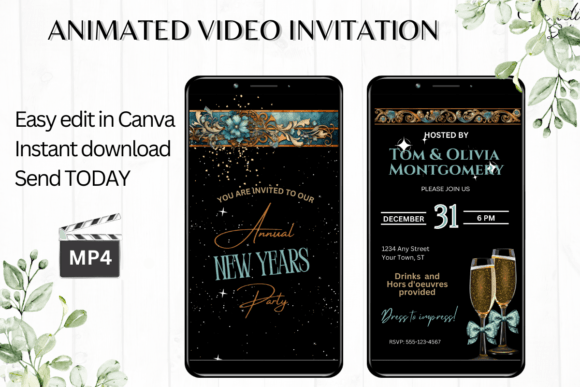
When the calendar flips to the final page, the pressure to celebrate is palpable, but so is the stress of organizing the event. If you are hosting a gathering this year—whether it’s an intimate dinner or a large virtual countdown—the first impression sets the tone. That is where the Digital New Years Eve Party Invite comes into play. This isn't just a generic graphic; it is a fully realized digital animated video invitation template designed to capture the energy of the night without requiring you to be a motion graphics expert.
The Aesthetic: Glitz Meets Modern Typography
Visually, this template strikes a balance between festive flair and modern typography. It avoids the trap of looking like a generic clip-art party flyer. Instead, it uses a cohesive design language that feels premium. The layout relies on strong visual hierarchy, ensuring that the date, time, and location are instantly readable, even on the small screen of a smartphone. The animation is subtle but effective; it creates a sense of anticipation and excitement that a static image simply cannot match. It functions as a high-end display font driven design asset, using text effects and motion to guide the viewer's eye.
For the brand strategist or entrepreneur, this template offers a chance to maintain brand consistency. You aren't just sending a text message; you are sending a branded piece of content. The style is versatile enough to fit a chic black-tie affair or a casual house party, depending on how you customize the color palette and font style.
Practicality in the Digital Age
One of the biggest hurdles in hosting is the logistics of communication. Physical mail is slow and expensive. This digital evite solves that problem with immediate utility. Because it is built on Canva, the barrier to entry is nonexistent. You do not need to download heavy software or worry about font licensing issues—the design assets are ready to go.
The workflow is designed for the busy content creator or small business owner. You receive a PDF with a direct link. Clicking it opens the template in your browser or on the Canva mobile app. From there, the editing options are robust:
- Text Personalization: You can easily add or delete text blocks. If your event has specific hashtags or dress codes, you can integrate them seamlessly.
- Typography Control: Change the font style, color, and size to match your specific vibe. Whether you prefer a sans serif font for a clean look or a script font for elegance, the control is in your hands.
- Animation Adjustments: Unlike static invites, you can tweak the animation effects to ensure the movement matches the energy of your party.
- Export Quality: The final product is a high-definition MP4 file (1080 x 1920 px), perfect for full-screen viewing on mobile devices.
Strategic Applications Beyond the Party
While the primary use case is a party invite, the utility of this template extends into professional realms. Consider the marketer or blogger looking to boost engagement at the end of the year. A static "Happy New Year" post often gets lost in the feed. However, a customized video invitation to a live stream, a webinar, or a special end-of-year sale acts as a creative font driven piece of social media graphics that stops the scroll.
For designers, this serves as a proof of concept. You can use the template to show clients how motion and typography interact. It is also an excellent tool for packaging design previews or editorial design teasers where you want to reveal a "New Collection" dropping at midnight. The ability to change text effects allows you to repurpose the asset for different verticals—changing the "Party Invite" text to "Flash Sale" or "Exclusive Access."
Optimizing Your Typography Choices
When you dive into the editor, you will notice the template comes with suggested pairings. However, if you are a hobbyist or crafter looking to add a personal touch, consider these practical tips for typography within this specific digital download:
- Evaluate Contrast: If you change the background color, ensure your text has enough contrast. A serif font with thin strokes might disappear against a busy background. In such cases, switch to a bold sans serif font or add a text shadow effect available in Canva.
- Readability on Mobile: Remember, this invite will likely be viewed on a phone screen. Avoid overly intricate handwritten fonts for the essential details (Time/Location). Save the decorative scripts for the headline "New Year's Eve."
- Brand Identity: If you are a business, use your brand fonts. Canva allows you to upload custom fonts if you have a Pro account, or you can search for "Commercial fonts" within the library that mimic your brand identity.
The User Experience and Final Output
The "immediate access" feature is crucial. Last-minute planning is a reality for many. By removing the "waiting for proofs" step, this premium font based template empowers you to act fast. Once you are satisfied with the design, downloading it as an MP4 is instant.
Sharing the file is versatile. You can send it directly via iMessage, WhatsApp, or Messenger. The motion graphic format ensures it won't be compressed into a blurry mess like some images are. Alternatively, Canva allows you to generate a link, which is perfect for web design integration—embed the invite on your website or link it in your bio. This flexibility makes it a superior choice compared to traditional graphic design static assets.
Ultimately, the Digital New Years Eve Party Invite is more than just a template; it is a communication tool. It bridges the gap between professional graphic design quality and the accessibility needed by the average user. Whether you are a publisher announcing a gala or a friend hosting a get-together, this asset provides the polish and professionalism your event deserves. It allows you to focus on the celebration, knowing your invitation has already made the right impression.