Optimize Your AI Strategy with ChatMate Dashboard V1
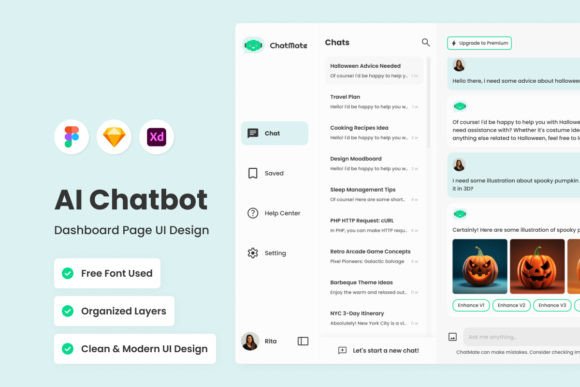
Managing an AI chatbot used to feel like flying blind. You would deploy a bot, hope for the best, and maybe check a few spreadsheets once a month to see if anyone complained. ChatMate - AI Chatbot Dashboard V1 changes that dynamic completely. It is a comprehensive design solution that transforms raw data into actionable insights, offering a holistic view of your chatbot ecosystem. Whether you are a small business owner trying to automate customer support or a marketer looking to drive engagement, this dashboard provides the visual interface you need to make informed decisions.
The core appeal of ChatMate lies in its ability to bridge the gap between complex backend data and human understanding. It is not just a collection of charts; it is a curated environment designed to help you optimize interactions. By visualizing performance metrics and user feedback side-by-side, you can spot trends that would otherwise get lost in the noise. It is about taking control of your conversational AI strategy with precision and clarity.
A Design System Built for Clarity
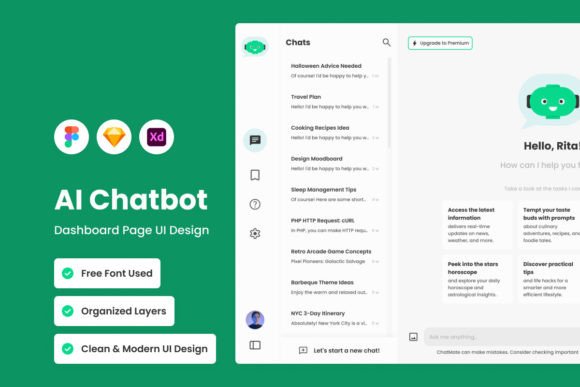
When you open the ChatMate - AI Chatbot Dashboard V1 files, the first thing you notice is the organization. The layers are well organized and neat, which is a massive time-saver for designers working under tight deadlines. There is no digging through unnamed groups or locked elements. The structure is logical, making it easy to adjust components to fit specific brand guidelines. This is a modern typography and layout system that respects the user's need for efficiency.
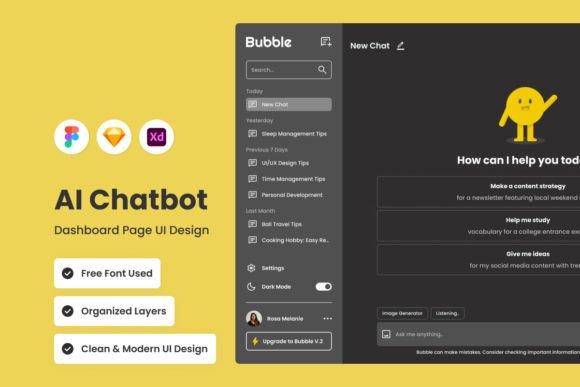
The visual style is clean, professional, and distinctly modern. It avoids the clutter that plagues many analytics dashboards. Instead, it uses ample white space and a clear visual hierarchy to guide the eye to what matters most. The use of open source fonts ensures that you can implement this design without worrying about expensive licensing fees down the line, making it an excellent choice for startups and freelancers. Furthermore, the inclusion of free vector icons means the graphic assets scale perfectly from mobile screens to large desktop monitors.
Speaking of screens, the kit includes both Desktop & Mobile versions. This is critical in today’s market. You cannot assume your users will only check their analytics from a desk. ChatMate ensures that the experience is responsive and intuitive, regardless of the device. The global text and color styles are set up to allow for rapid rebranding. If your client uses a specific shade of blue or a unique sans serif font for their brand identity, you can swap these out globally in minutes.
Strategic Applications for Creators and Businesses
Who is this dashboard for? The short answer is anyone serious about digital engagement. However, the practical applications vary depending on your role. For the entrepreneur or small business owner, ChatMate serves as a command center. You can monitor customer sentiment in real-time. If the bot is failing to answer a specific question, you see the drop-off in engagement immediately. This allows you to tweak the conversation flows to improve customer satisfaction.
For marketers and content creators, the dashboard is a goldmine for understanding audience behavior. It helps you see which content triggers the most interaction. Are users asking about a specific product feature? Is the bot successfully upselling services? By analyzing these metrics, you can refine your marketing copy and social media graphics to better align with what your audience actually wants. It turns your chatbot from a static tool into a dynamic feedback loop.
Designers and developers will appreciate the compatibility aspect. The files are fully compatible with Figma, Sketch, and Adobe XD. This means you can integrate ChatMate into your existing workflow without friction. It functions as a robust design asset that speeds up the prototyping phase. Instead of building a dashboard UI from scratch, you have a high-quality foundation that allows you to focus on the logic and functionality of the AI itself.
Visual Hierarchy and User Experience
Good design is invisible, but ChatMate - AI Chatbot Dashboard V1 achieves something difficult: it makes data beautiful without sacrificing utility. The layout utilizes a grid system that balances density with readability. This is crucial for web design where users often scan rather than read. The hierarchy guides the user from high-level KPIs (Key Performance Indicators) down to granular user feedback logs.
The personality of the design is trustworthy and competent. It avoids playful gimmicks that might undermine the seriousness of business intelligence. This makes it suitable for commercial applications where professionalism is key. Whether you are presenting this to a board of directors or using it for your own daily operations, the aesthetic supports a narrative of competence and technological advancement.
Technical Flexibility and Customization
One of the strongest points of this asset is its adaptability. While it comes with a distinct style, it is designed to be a chameleon. The design that is easy to adjust means you aren't locked into a specific aesthetic. You can strip it back to a minimalist monochrome look or inject vibrant brand colors.
Because the layers are well organized and neat, you can easily isolate elements. Perhaps you only need the sidebar navigation for a different project, or you want to repurpose the chart styles for a financial report. The modularity of the design allows for this kind of creative reuse. It is a versatile tool in your design assets library.
It is also important to note the licensing regarding images. All images are used for preview purposes only and are NOT included in the main file. This is standard practice, but it highlights the need to source your own imagery. However, this is actually a benefit. It forces you to select visuals that match your specific brand identity rather than relying on generic stock photos. It ensures the final product feels authentic to your specific use case.
Conclusion: Elevating Your AI Ecosystem
In a digital landscape crowded with generic templates, ChatMate - AI Chatbot Dashboard V1 stands out as a thoughtful, professional tool. It empowers you to move beyond simply "having" a chatbot to actively managing and optimizing it. By providing clear insights into performance and user feedback, it helps you drive engagement and improve the overall user experience.
Whether you are a designer looking for a robust starting point, a blogger wanting to understand your audience better, or a business owner aiming to streamline operations, this dashboard offers real-world value. It combines modern typography